Invoice Generator for Web Developers
You build the internet, but your invoicing should not feel like debugging spaghetti code. Whether you bill for a full-stack build, a monthly maintenance retainer, or hosting renewals, create structured invoices that keep projects and payments on track.
Create Your First Invoice — Free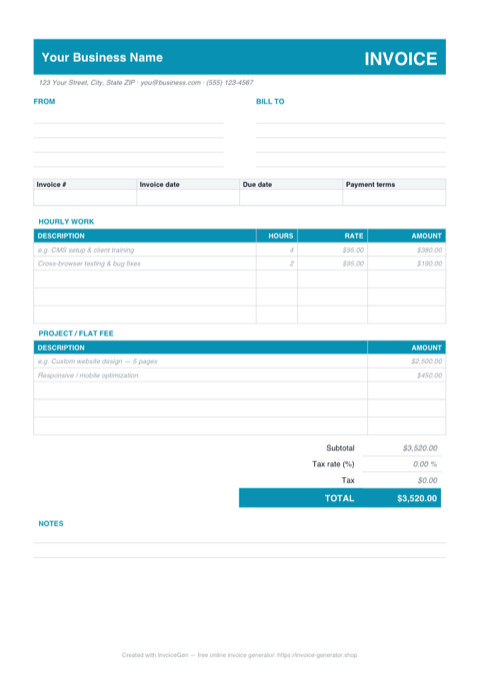
Download a Free Web Design Invoice Template
Pre-built for how web developers bill — grab it in the format you already work in. No sign-up required.
Prefer Google Docs? Download the Word file, upload it to Google Drive, and open it with Google Docs.
Invoicing Challenges for Web Developers
Project Scope Changes
Clients request new features mid-build that were not in the original specification. Without documenting scope changes on invoices, you end up doing unpaid work or fighting over what was included.
Hosting and Domains as Line Items
When you manage hosting, domains, and SSL certificates for clients, these recurring costs need to appear clearly on invoices so clients understand they are paying for infrastructure, not just your time.
Maintenance Retainers
Ongoing support contracts require recurring invoices with clear scopes — hours included, what constitutes emergency support, and how overages are handled. Vague retainer invoices lead to mismatched expectations.
Web Developers Invoicing Tips
Split Design and Development Phases
Invoice design (wireframes, mockups, prototypes) separately from development (coding, testing, deployment). This lets the client approve and pay for each phase before you move on.
Itemize Third-Party Costs
List hosting fees, domain renewals, premium plugins, and API subscriptions as individual line items. Transparency prevents clients from questioning your markup or assuming these costs are included in your rate.
Define Maintenance Scope on Every Invoice
Each retainer invoice should state the hours included, hours used, and what types of work are covered (bug fixes, content updates, security patches). This prevents scope creep on support contracts.
Use Version or Sprint References
If you work in sprints or release versions, reference the sprint number or version on each invoice. This ties your billing directly to delivered functionality and makes client approvals smoother.
What to Include on a Web Developers Invoice
- Project name and phase (design, development, QA)
- Sprint or version number if applicable
- Hours worked with task descriptions
- Hosting and domain fees passed through
- Third-party licenses or API costs
- Maintenance retainer amount and hours included
- Scope change references with approved costs
- Deployment or launch milestone
Ready to invoice your next client?
Create Your Invoice NowFrequently Asked Questions
How should web developers invoice for scope changes?
Should I invoice hosting separately from development?
How do I structure a maintenance retainer invoice?
What payment schedule works best for web development projects?
Which Format Should You Use for Web Design Invoices?
PDF, Excel, Word, or Google Docs — here is where each format earns its keep for web developers.
Your typography survives the trip
Custom fonts, kerning, and line-height baked into the PDF stay intact on the client's laptop, phone, or printed proof. A Word doc would substitute your display font with Calibri the moment a procurement team opens it in a different license tier.
Fixed layout for milestone billing
Multi-phase web design invoices list discovery, wireframes, visual design, and build as separate milestones. A PDF keeps the columns and totals aligned even when clients forward the file to a legal team or external project manager.
Excel
SUMIF by project phase
Add a phase column (Discovery, UX, Visual, Build, QA) and let =SUMIF() total each bucket in a side panel. Clients who ask "how much did the design phase run?" get the answer in the same file, no pivot-table gymnastics required.
Ready to pipe into QuickBooks Online
Save as a CSV variant and QuickBooks' import mapper picks up date, customer, item, quantity, and rate columns automatically. Beats retyping every line item when a sprint invoice has 30+ rows.
Word
Drop-in header rebrand in under a minute
Replace the placeholder logo, tweak the accent color under Design > Colors, and swap the heading font — Word keeps the existing table structure intact. No exporting to Figma and back just to send a branded invoice for one off-scope task.
Save as a .dotx studio template
Once your branding is dialed in, File > Save As > Word Template (.dotx) creates a reusable starting point. Every designer on the team opens a fresh invoice with the right logo, margins, and signature block — no copy-pasting from last month's file and forgetting to update a date.
Google Docs
Comment-driven invoice review
Highlight a line item and tag your project manager with @ mention. They reply in-thread to confirm the hours or ask why a revision round is billed separately. Beats a Slack call-and-response thread that gets buried by noon.
One link replaces the email attachment
Share the Doc with "Anyone with the link can view" and the client lands on a clean, branded invoice in their browser — no PDF viewer, no download. Revoke access or swap to a PDF export later if the client's AP team demands a static file.
Pro Tips for Your Web Design Invoice Template
Export with tagged PDF accessibility structure
Most design tools offer a "tagged PDF" export option that adds semantic structure to headings and tables. Enterprise clients running ADA or WCAG compliance scans on incoming vendor documents will flag untagged PDFs — a thirty-second export-setting change keeps your invoice out of their exception queue.
Lock the formula column before sending
Under Review > Protect Sheet, allow edits only on the input columns (hours, rate, description) and lock the calculated totals. Clients occasionally open invoices and accidentally overwrite a =SUM() cell while trying to copy a number — protected sheets show exactly what you sent without disabling their ability to review the detail.
Build a Quick Parts library of reusable blocks
In Word, highlight standard sections — your deposit terms, your revision-round policy, your payment instructions — and save each as a Quick Part under Insert > Quick Parts > Save Selection. Typing the first letters of the entry name auto-inserts the whole block. New invoices assemble in seconds from pre-approved language.
Use a template in your team's Shared Drive, not My Drive
Create the invoice template inside a Shared Drive rather than a personal My Drive folder, then duplicate from there for each project. Shared Drive ownership is tied to the organization, so invoices survive a designer leaving the studio — files in someone's personal Drive vanish with their account under Workspace's default offboarding.
Related Templates & Tools
Web Design Invoice Template
Free web design invoice template for agencies and freelancers. Handle revisions, milestones, hosting fees, and file delivery with professional PDF invoices.
Auto Repair Shops Invoice Generator
Free invoice generator for auto repair shops. Break down parts and labor, track warranty coverage, handle insurance claims, and create detailed repair invoices as PDF.
Construction Companies Invoice Generator
Free invoice generator for construction companies. Handle AIA-style progress billing, subcontractor costs, retainage, lien waivers, and change orders.
Invoicing Guides & Tips
Learn best practices for invoicing, payment terms, and getting paid on time.