Excel Invoice Template
A free .xlsx invoice template with real, working formulas: line amounts, subtotal, tax, and total all calculate themselves. Download it, fill in your details, and send — no sign-up, no email gate, no watermark.
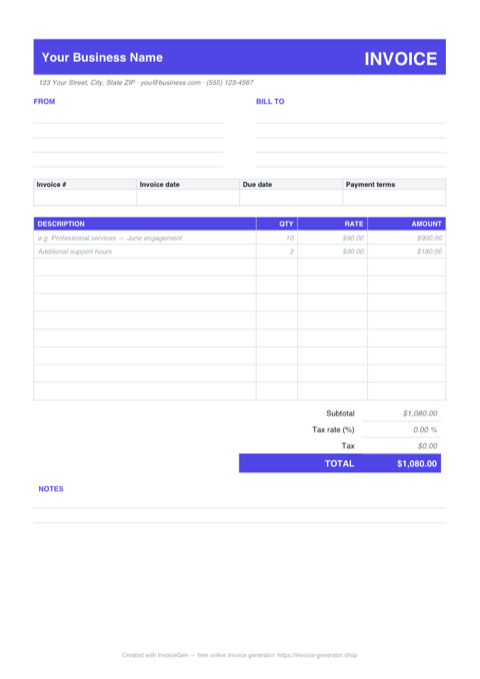
Working Formulas
The subtotal is a real SUM over your line items, and the tax-rate cell feeds the tax and grand total. Change any number and everything recalculates instantly.
Blank-Safe Rows
Unused rows stay clean. Each amount only calculates once you enter both a quantity and a rate, so empty lines never show $0.00 or formula errors.
Print-Ready Layout
A styled header, aligned columns, and a totals block sized to print cleanly on A4. Fill it in, then Save As PDF to send a polished invoice.
How to Use the Template
Download the .xlsx
Grab the file with one click — no email address, no account, no unlock steps. It opens in Excel, LibreOffice Calc, and Google Sheets.
Fill In Your Details
Replace the placeholder business and client info, then add line items. Amounts, subtotal, tax, and total calculate themselves as you type.
Save as PDF & Send
Use File > Save As (or Export) and choose PDF to send your client a clean, uneditable invoice — or print it straight from the sheet.
What's Inside the Free Excel Invoice Template
This is a real, working Excel invoice template — not a styled grid you have to wire up yourself. Everything you need to bill a client is pre-built:
- A complete invoice layout — header with your business details, a Bill To block, invoice number, dates, and payment terms fields, plus a notes area for payment instructions.
- A line-item table with live amounts — enter a description, quantity, and rate, and the amount column fills itself in. The formulas are blank-safe: empty rows stay empty instead of showing zeros or errors.
- Working totals — the subtotal is a genuine SUM over the line-item rows, and the editable tax-rate cell drives the tax line and the grand total. No manual math anywhere.
- An A4 print area — the sheet is sized so the finished invoice prints (or exports to PDF) on a single clean page.
- Worked example rows — two sample line items show how everything fits together; overwrite them with your own and you're done.
How to Use It
Download the .xlsx, open it in Excel (LibreOffice Calc and Google Sheets work too), and replace the placeholder text with your business name, your client's details, and the invoice number and dates. Then list what you're billing for: one row per product or service, with a quantity and a rate. Set your tax rate in the totals block if you charge VAT, GST, or sales tax — the tax amount and total update automatically.
One practical tip: the template ships with several blank line-item rows. If you need more, insert new rows betweenthe existing ones rather than below the last row, so the subtotal's SUM range expands automatically to include them. When everything looks right, use File > Save As and choose PDF — clients should receive a PDF, not a raw spreadsheet, so totals and formatting can't be accidentally changed.
Want to go deeper on spreadsheet invoicing? Our guide on how to auto-generate invoices in Excel covers formulas, numbering, and automation in detail, and our payment terms guide explains how to set due dates that actually get you paid on time.
When an Online Generator Is Faster
The Excel template is a solid choice if you invoice occasionally, work offline, or simply like having full control of the file. But there are situations where the online invoice generator saves real time:
- You invoice regularly — the generator remembers your details, numbers invoices for you, and produces a PDF in one click, with no Save As step.
- You bill in multiple currencies — pick from 160+ currencies in a dropdown instead of reformatting cells.
- You want your logo placed automatically — upload it once and the layout adjusts, no image anchoring or resizing.
- You add and remove line items a lot — rows grow and shrink freely with no SUM ranges to keep an eye on.
Both options are completely free, so use whichever fits the job — the spreadsheet for occasional, hands-on invoicing, the generator for speed and volume. If you are self-employed and new to invoicing, either will get you to a professional invoice in minutes.