Auto Repair Invoice Template — Excel
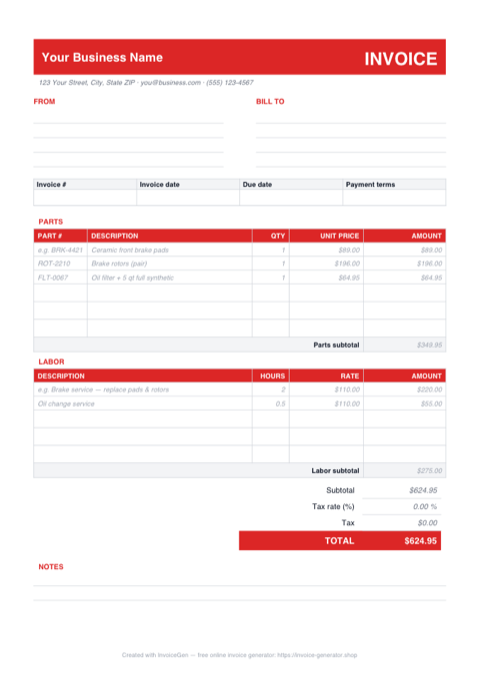
The spreadsheet mirrors a real repair order: a PARTS table with a Part # column and its own subtotal, a LABOR table billed in hours times rate beneath it, and a totals block that adds the two together. Enter a quantity and a unit price and the amount, both subtotals, tax, and TOTAL recalculate on their own — no setup, no macros.
Why Excel for Auto Repair Shops
Parts and labor in separate, self-subtotaling sections
Parts rows carry a PART # column (the samples — BRK-4421 ceramic pads, ROT-2210 rotors — show the convention) and roll into a Parts subtotal; labor lines compute HOURS × RATE into a Labor subtotal. Customers and adjusters see the parts/labor split they expect on an RO, and you can quote the labor share of any job without recomputing a thing.
Blank-safe amount formulas — empty rows stay empty
Every amount cell uses =IF(OR(qty="",price=""),"",qty*price), so the three spare rows in each section show nothing instead of a column of $0.00s. Clear the sample brake-job lines and the sheet still totals correctly; half-filled rows simply don't count until both quantity and price are in.
One editable tax-rate cell drives all the tax math
The yellow-highlighted cell beside "Tax rate" is percent-formatted: type 8.25% once and the Tax line computes subtotal × rate and feeds the TOTAL. If your state taxes parts but not labor, point that Tax formula at the Parts subtotal cell instead of the combined subtotal — a ten-second edit that matches how most states treat repair work.
Long tickets extend without breaking the totals
The subtotals are plain =SUM() ranges, so on a big job — say a timing chain with fifteen part lines — right-click and insert rows above the subtotal and the range stretches automatically. Copy any existing Amount cell into the new rows to pick up the blank-safe formula.
Invoicing Challenges for Auto Repair Shops
Parts and Labor Breakdown
Customers distrust lump-sum repair bills. They want to see every part listed with its cost and every hour of labor justified. A vague invoice leads to negative reviews and lost repeat business.
Warranty Tracking
Parts and labor warranties vary by component and supplier. Your invoices need to clearly state warranty terms for each item so you and the customer both know what is covered if something fails.
Insurance and Fleet Claims
Insurance companies and fleet managers require specific invoice formats with detailed descriptions, part numbers, and labor codes. Generic invoices get rejected or delay reimbursement.
Auto Repair Excel Invoicing Tips
Save a rate-loaded copy as your shop master
Open the download once, replace the sample $110/hr with your door rate, set your tax percentage in the yellow cell, and fill the FROM block with your shop details — then Save As something like shop-invoice-master.xlsx. Every new ticket starts from that copy, so the only typing per job is part numbers, descriptions, and hours. Shops that skip this step re-enter their own address hundreds of times a year.
Include Part Numbers and Brands
List the OEM or aftermarket part number, brand, and whether the part is new or remanufactured. This level of detail builds customer confidence and simplifies warranty claims.
Standardize Labor Rate Display
Show your shop’s hourly labor rate and the time allocated for each repair task. Reference industry-standard labor guides (like Mitchell or AllData) so customers see that your estimates are fair.
Add Vehicle Details to Every Invoice
Include the vehicle’s year, make, model, VIN, and current mileage. This creates a service history record and is essential for warranty and insurance claims.
Note Warranty Terms Per Line Item
Different parts carry different warranties. Note the warranty period (e.g., 12 months / 12,000 miles) next to each part so the customer has a clear reference if an issue arises.
What to Include on a Auto Repair Excel Invoice
- Vehicle year, make, model, and VIN
- Current mileage at time of service
- Each part with part number, brand, and cost
- Labor hours and shop hourly rate
- Warranty terms for parts and labor
- Diagnostic fees
- Shop supplies and environmental fees
- Authorization signature or work order reference
Generate Your Auto Repair Excel Invoice Now
Create Invoice — Free, No Sign-UpFrequently Asked Questions
Which versions of Excel does this template work in?
Does it open in LibreOffice Calc or Apple Numbers?
Why is the Amount column empty on rows I haven't filled in yet?
Related Invoice Tools
Auto Repair Shops Invoice Generator
Free invoice generator for auto repair shops. Break down parts and labor, track warranty coverage, handle insurance claims, and create detailed repair invoices as PDF.
Excel Invoice Template
Free Excel invoice template library — download, customize, and send.
Auto Repair Invoice Template
Free auto repair invoice template with parts, labor, and warranty tracking. Generate detailed repair invoices as professional PDFs in seconds.
Auto Repair Invoice — PDF
Free auto repair invoice PDF with separate parts and labor tables, blank rows to fill in, and a totals block. Print it at the counter or attach it to an email.
Auto Repair Invoice — Word
Free auto repair invoice template as a .docx. Overtype the placeholder text, add your shop logo, swap the red accent for your brand color, and save to PDF.
Photography Invoice — Excel
Free photography invoice template for Excel. Package and add-on rows multiply quantity by rate, the tax cell is editable, and the retainer feeds the balance.
Cleaning Invoice — Excel
Download a free cleaning invoice template in Excel (.xlsx) with service date and frequency columns, blank-safe amount formulas, an editable tax cell, and live totals.
Freelance Invoice — Excel
Free freelance invoice for Excel (.xlsx). Hourly and flat-fee sections feed one subtotal, amounts stay blank until filled, and a cell sets the tax rate.