Photography Invoice Template — Excel
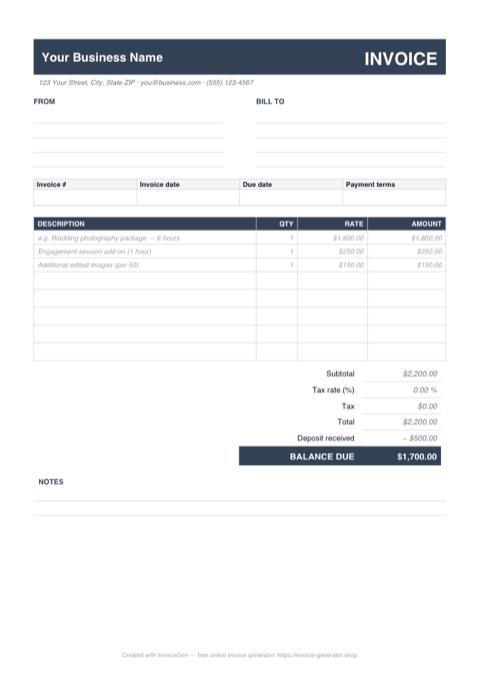
Open the .xlsx and the math is already wired. Type a quantity and a rate and the amount column fills itself, the subtotal rolls up all eight item rows, and the 'Deposit received' cell — preloaded with a sample $500 retainer — subtracts straight into the balance your couple actually owes after the wedding.
Why Excel for Photographers
Package and add-on rows that calculate themselves
The sheet arrives with three worked examples: a 6-hour wedding photography package at $1,800, a one-hour engagement-session add-on, and additional edited images priced per 50. Overwrite the descriptions with your own mini-session or headshot packages — every amount recomputes the instant you press Enter.
Deposit received feeds a live BALANCE DUE
The bottom of the totals stack subtracts the 'Deposit received' cell from the invoice total by formula. Log a retainer at booking, collect a second payment before the shoot, and the balance due updates each time you change that one number — no recalculating by hand before you reprint.
Empty rows stay empty — no stray $0.00
Each amount cell uses IF(OR(qty="",rate=""),"",qty*rate), so the five unused item rows display nothing instead of a column of zeros. A simple two-line portrait invoice prints just as cleanly as a fully loaded wedding one.
One editable tax cell reprices the sheet
Type your sales-tax rate into the 'Tax rate' cell once and the tax and total rows recompute from the subtotal. If your state doesn't tax photography services, leave it at zero — the rows still render tidily rather than erroring out.
Invoicing Challenges for Photographers
Deposits and Balance Payments
Most photographers require a deposit to book a session and collect the balance on delivery. Tracking which clients have paid deposits and what remains due across dozens of bookings gets complicated fast.
Licensing and Usage Rights
Commercial clients pay differently depending on how they use your images. A single image licensed for a billboard campaign costs more than the same image on a blog post, and your invoice needs to spell this out.
Travel and Equipment Expenses
Destination shoots, rental gear, and assistant fees add up. If you do not itemize these on the invoice, clients question the total or you end up absorbing costs you should be passing through.
Photography Excel Invoicing Tips
Duplicate the sheet tab for every shoot instead of overwriting
Right-click the sheet tab, choose 'Move or Copy', tick 'Create a copy', and rename it to the client and shoot date. The blank-safe formulas, deposit logic, and editable tax cell all carry over untouched. By the end of the season the workbook doubles as your billing ledger — flip through the tabs to see every retainer collected and every balance still outstanding.
Define Packages Clearly
List exactly what each package includes — number of edited images, hours of coverage, print credits — so clients can see the value and you have a reference point for add-ons.
Specify Usage Rights on the Invoice
State the license type (personal, commercial, exclusive) and duration directly on the invoice. This protects your intellectual property and justifies premium pricing for commercial usage.
Collect Deposits Before the Shoot
Require a non-refundable deposit (typically 25-50%) to reserve the date. Show it as a line item on the final invoice so the client sees the remaining balance clearly.
Itemize Post-Production Separately
Editing, retouching, and color grading take significant time. Breaking out post-production as its own line item helps clients understand your pricing and opens the door for upselling premium retouching.
What to Include on a Photography Excel Invoice
- Session date, time, and location
- Package or session type selected
- Number of final edited images included
- Licensing terms and usage rights granted
- Deposit paid and balance remaining
- Travel and accommodation expenses
- Additional retouching or print fees
- Delivery timeline for final images
Generate Your Photography Excel Invoice Now
Create Invoice — Free, No Sign-UpFrequently Asked Questions
How do I record a second payment without breaking the balance due?
Do the formulas work in LibreOffice Calc, Apple Numbers, or Google Sheets?
How do I add more line rows without breaking the subtotal?
Related Invoice Tools
Photographers Invoice Generator
Free invoice generator for photographers. Handle session deposits, balance payments, licensing fees, travel expenses, and package pricing with professional PDF invoices.
Excel Invoice Template
Free Excel invoice template library — download, customize, and send.
Photography Invoice Template
Free photography invoice template for session fees, deposits, licensing, and travel expenses. Create polished PDF invoices that match your portfolio.
Photography Invoice — PDF
Free photography invoice template as a print-ready A4 PDF with blank FROM, BILL TO, and line-item rows, plus a deposit and balance-due section. Fill it in and send it.
Photography Invoice — Word
Free photography invoice template for Word. Swap the placeholder studio details for yours, drop a logo into the header, restyle the charcoal accents, then export a PDF.
Construction Invoice — Excel
Free construction invoice in Excel. Schedule of values columns compute each draw, an editable retainage % cell feeds the total due, and rows stay blank-safe.
Contractor Invoice — Excel
Excel contractor invoice with a built-in materials/labor split, blank-safe line formulas, and editable markup % and tax-rate cells. Totals recalculate as you type.
Consulting Invoice — Excel
Free consulting invoice for Excel (.xlsx): a time-tracking sheet where Date, Hours, and Rate feed blank-safe formulas, a Total hours counter, and a tax cell.