Contractor Invoice Template — Excel
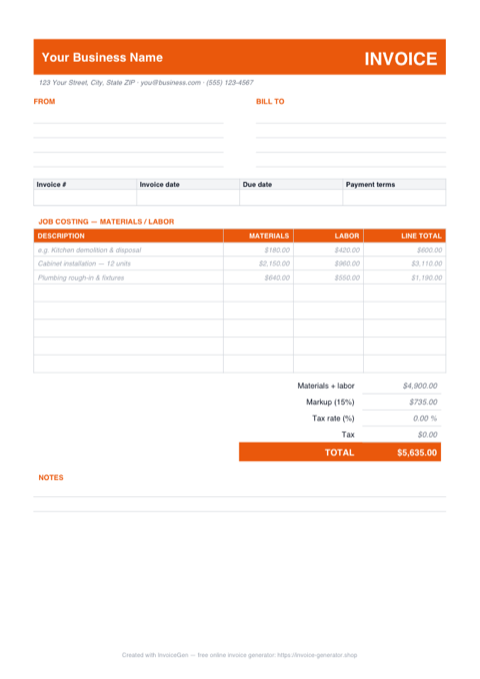
The .xlsx is wired, not just drawn: every line splits MATERIALS and LABOR into their own columns, a LINE TOTAL formula adds them, and a single markup % cell reprices the whole job. Punch in the receipt totals and crew hours, set your tax rate, and the TOTAL at the bottom is right before you close the laptop.
Why Excel for Contractors
Materials and labor stay split, the way the trade bills
Each row has separate MATERIALS and LABOR columns with a LINE TOTAL that adds whichever side you fill. The three sample rows — kitchen demo, cabinet install, plumbing rough-in — show the pattern; type your own scope over them and the math carries on.
One markup cell reprices the entire job
The Markup % cell ships at 15%. Change it to your number and the Markup row recomputes against the materials-plus-labor subtotal, with the TOTAL following instantly — no per-line edits when you sharpen a bid or a negotiation moves your margin.
Blank rows stay blank, not $0.00
The line-total formula checks whether both the materials and labor cells are empty and returns nothing if they are. The five spare rows print clean instead of showing a column of zeros, and a labor-only line with no materials still totals correctly.
Tax is an editable cell, applied after markup
Set the Tax rate cell to your state's rate and the Tax row computes on the marked-up subtotal; leave it at 0 if you pass tax through on material receipts instead. Either way the TOTAL formula picks the change up without you touching anything else.
Invoicing Challenges for Contractors
Progress Billing for Multi-Phase Jobs
A single invoice at project end is risky for large jobs. You need to bill at each phase — foundation, framing, finishing — and track percentage complete so both you and the client agree on what has been delivered.
Managing Change Orders
Clients request changes mid-project that alter costs and timelines. Without documenting change orders on invoices, you absorb the extra cost or end up in a dispute about what was agreed.
Separating Materials and Labor
Clients and tax authorities both want to see materials and labor broken out. Lumping everything into a single line item creates confusion at tax time and erodes client trust.
Contractor Excel Invoicing Tips
Insert extra rows inside the table, not below it
The subtotal is =SUM(D16:D23), so a line typed below row 23 silently falls outside the total. Need more than eight lines? Right-click a middle row, choose Insert, and drag the LINE TOTAL formula down into the new row — inserting inside the range expands the SUM automatically and the invoice keeps adding up.
Use Milestone Billing
Define clear milestones (e.g., 30% at demolition complete, 30% at rough-in, 40% at final walkthrough) so cash flows in as work progresses rather than piling up at the end.
Track Retainage Separately
Many contracts hold back 5-10% retainage until project completion. Show retainage as a separate line item on each invoice so both parties can track the cumulative holdback.
Document Change Orders on Invoices
When scope changes, add the change order as a distinct section on the next invoice with its own description, cost, and reference to the signed change order document.
Include Permit and Inspection Costs
If you are passing through permit fees or inspection costs, itemize them separately. Transparency here prevents disputes and shows the client exactly where their money goes.
What to Include on a Contractor Excel Invoice
- Project name and job site address
- Phase or milestone description
- Materials with itemized costs
- Labor hours and rates by trade
- Change order references and amounts
- Retainage held to date
- Permit and inspection fees
- Balance due this period
Generate Your Contractor Excel Invoice Now
Create Invoice — Free, No Sign-UpFrequently Asked Questions
Which versions of Excel open this contractor invoice template?
Does the template work in LibreOffice Calc, Apple Numbers, or Google Sheets?
The markup applies to materials and labor — can I mark up materials only?
Related Invoice Tools
Contractors Invoice Generator
Free invoice generator for contractors. Handle progress billing, change orders, materials and labor splits, and retainage tracking with PDF invoices.
Excel Invoice Template
Free Excel invoice template library — download, customize, and send.
Contractor Invoice Template
Free contractor invoice template for independent contractors. Handle milestone billing, materials, labor rates, and retainage with professional PDF invoices.
Contractor Invoice — PDF
Contractor invoice template in PDF — fill it on screen or by hand, print on A4 or Letter, and email a totals-locked bill to the GC. Free download, no sign-up.
Contractor Invoice — Word
Editable .docx contractor invoice — type over the placeholders, drop your logo in the header bar, recolor the accent, then export to PDF or open it in Google Docs.
Construction Invoice — Excel
Free construction invoice in Excel. Schedule of values columns compute each draw, an editable retainage % cell feeds the total due, and rows stay blank-safe.
Consulting Invoice — Excel
Free consulting invoice for Excel (.xlsx): a time-tracking sheet where Date, Hours, and Rate feed blank-safe formulas, a Total hours counter, and a tax cell.
Photography Invoice — Excel
Free photography invoice template for Excel. Package and add-on rows multiply quantity by rate, the tax cell is editable, and the retainer feeds the balance.