Contractor Invoice Template — Word
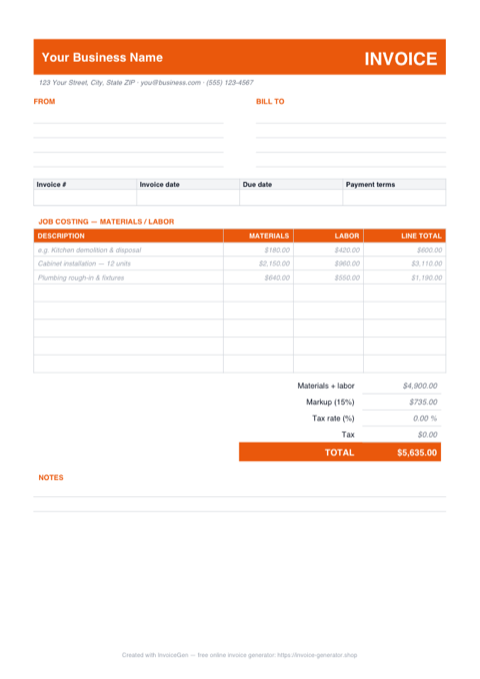
The .docx opens ready to rebrand: every spot that needs your details says so — Your Business Name in the header bar, the address line, the INV-0001 number — and the colored banner takes your company color in two clicks. Brand it once, save it as your master, and every invoice after that is type-the-job-and-export.
Why Word for Contractors
Placeholders tell you exactly what to replace
Click the Your Business Name text in the banner and type over it, then work down the FROM block, the BILL TO block, and the invoice-number boxes. The sample costing lines — demo, cabinet install, rough-in — show how to phrase scope before you overwrite them with yours.
Logo and accent color are two edits
The header banner is a shaded table cell: click inside it and use Table Design > Shading to swap the orange for your company color, then Insert > Pictures to drop the truck-door logo beside your name. The table snaps everything back into alignment.
Save As PDF straight from Word
File > Save As, pick PDF, and Word produces the send-ready copy with the banner and table borders exactly as you styled them. Keep the .docx as your editable master and email only the PDF so nobody downstream retypes a line total.
Searched for a Google Docs version? Upload this one
Drag the .docx into Google Drive, right-click it, and choose Open with > Google Docs — the table layout and shading convert cleanly. From there you can edit on any browser or phone and download the result as PDF or Word whenever a job wraps.
Invoicing Challenges for Contractors
Progress Billing for Multi-Phase Jobs
A single invoice at project end is risky for large jobs. You need to bill at each phase — foundation, framing, finishing — and track percentage complete so both you and the client agree on what has been delivered.
Managing Change Orders
Clients request changes mid-project that alter costs and timelines. Without documenting change orders on invoices, you absorb the extra cost or end up in a dispute about what was agreed.
Separating Materials and Labor
Clients and tax authorities both want to see materials and labor broken out. Lumping everything into a single line item creates confusion at tax time and erodes client trust.
Contractor Word Invoicing Tips
Retype the totals when you change the lines
Unlike the Excel version, the dollar figures here are typed text, not formulas — Word won't recompute the Materials + labor row, the 15% markup, or the TOTAL when you edit a line. Either re-add them by hand before exporting, or run the numbers in the Excel template and paste the final figures into this one for the client-facing copy.
Use Milestone Billing
Define clear milestones (e.g., 30% at demolition complete, 30% at rough-in, 40% at final walkthrough) so cash flows in as work progresses rather than piling up at the end.
Track Retainage Separately
Many contracts hold back 5-10% retainage until project completion. Show retainage as a separate line item on each invoice so both parties can track the cumulative holdback.
Document Change Orders on Invoices
When scope changes, add the change order as a distinct section on the next invoice with its own description, cost, and reference to the signed change order document.
Include Permit and Inspection Costs
If you are passing through permit fees or inspection costs, itemize them separately. Transparency here prevents disputes and shows the client exactly where their money goes.
What to Include on a Contractor Word Invoice
- Project name and job site address
- Phase or milestone description
- Materials with itemized costs
- Labor hours and rates by trade
- Change order references and amounts
- Retainage held to date
- Permit and inspection fees
- Balance due this period
Open This Template in Google Docs
- 1
Download the free .docx template using the button above.
- 2
Go to drive.google.com and upload the file to your Drive.
- 3
Right-click the file and choose Open with → Google Docs.
Generate Your Contractor Word Invoice Now
Create Invoice — Free, No Sign-UpFrequently Asked Questions
Do I need Microsoft Word to use this .docx contractor invoice?
Does the template convert cleanly to Google Docs?
Can I turn this into company letterhead for quotes and change orders?
Related Invoice Tools
Contractors Invoice Generator
Free invoice generator for contractors. Handle progress billing, change orders, materials and labor splits, and retainage tracking with PDF invoices.
Word Invoice Template
Free Word invoice template library — download, customize, and send.
Contractor Invoice Template
Free contractor invoice template for independent contractors. Handle milestone billing, materials, labor rates, and retainage with professional PDF invoices.
Contractor Invoice — PDF
Contractor invoice template in PDF — fill it on screen or by hand, print on A4 or Letter, and email a totals-locked bill to the GC. Free download, no sign-up.
Contractor Invoice — Excel
Excel contractor invoice with a built-in materials/labor split, blank-safe line formulas, and editable markup % and tax-rate cells. Totals recalculate as you type.
Consulting Invoice — Word
Editable Word .docx consulting invoice — overtype the placeholder firm and client blocks, drop your logo in the blue banner, recolor the accent, and export a PDF.
Photography Invoice — Word
Free photography invoice template for Word. Swap the placeholder studio details for yours, drop a logo into the header, restyle the charcoal accents, then export a PDF.
Auto Repair Invoice — Word
Free auto repair invoice template as a .docx. Overtype the placeholder text, add your shop logo, swap the red accent for your brand color, and save to PDF.