Invoice Generator for Graphic Designers
Designing a great invoice should not take as long as designing for your clients. Handle revision rounds, rush fees, and kill fees with clear, professional invoices that protect your creative time and keep cash flowing.
Create Your First Invoice — Free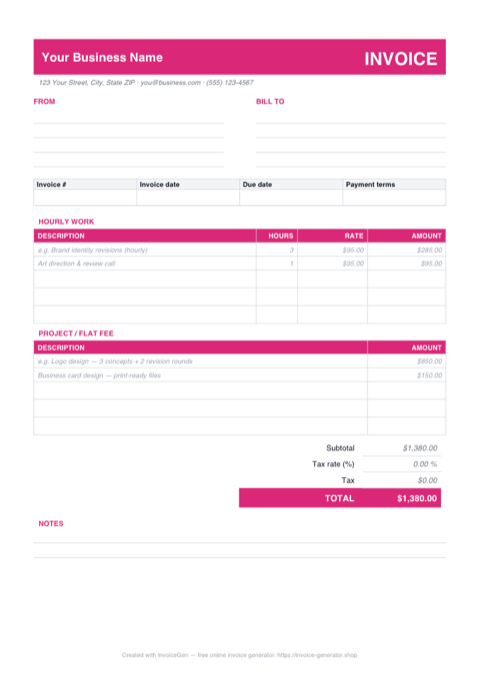
Download a Free Graphic Design Invoice Template
Pre-built for how graphic designers bill — grab it in the format you already work in. No sign-up required.
Prefer Google Docs? Download the Word file, upload it to Google Drive, and open it with Google Docs.
Invoicing Challenges for Graphic Designers
Billing for Revision Rounds
Clients often expect unlimited revisions. Without a clear invoice structure that shows included rounds versus paid extras, you end up doing free work or having uncomfortable conversations after the fact.
Spec Work and Kill Fees
Projects get canceled mid-stream, sometimes after you have invested dozens of hours. If you have not invoiced a deposit or defined a kill fee, you walk away with nothing to show for your time.
Rush Fees and Scope Changes
Last-minute deadlines and evolving briefs are the norm in design. Your invoicing needs to accommodate rush surcharges and mid-project scope expansions without creating friction.
Graphic Designers Invoicing Tips
Define Revision Rounds in Your Invoice
State that the project fee includes a specific number of revision rounds (e.g., two). Additional rounds are billed at your hourly rate. Print this on the invoice so expectations are documented.
Use Milestone Payments for Large Projects
For branding or multi-deliverable projects, split the total into milestones: concept, first draft, final delivery. Invoice at each milestone so you are never more than one phase ahead of payment.
Include a Kill Fee Clause
If a project is canceled after work has begun, a kill fee (typically 25-50% of the total) compensates you for time invested. Reference it on your deposit invoice so clients are aware upfront.
Add Rush Fee Line Items
When a client needs a 48-hour turnaround instead of two weeks, add a rush fee as a separate line item (commonly 25-50% surcharge). Transparency here prevents pushback on the final total.
What to Include on a Graphic Designers Invoice
- Project name and brief description
- Deliverables (logo files, social media templates, etc.)
- Number of revision rounds included
- Rush fee surcharge if applicable
- File formats to be delivered (AI, PSD, PNG, SVG)
- Licensing or ownership transfer terms
- Milestone or phase being invoiced
- Kill fee terms for early cancellation
Ready to invoice your next client?
Create Your Invoice NowFrequently Asked Questions
How should graphic designers charge for revisions?
What is a kill fee and should I include one?
Should I charge rush fees for design work?
How do I handle file ownership on design invoices?
Which Format Should You Use for Graphic Design Invoices?
PDF, Excel, Word, or Google Docs — here is where each format earns its keep for graphic designers.
Embeds custom fonts so your brand doesn't fall back to Arial
When you export a PDF with 'Embed All Fonts' checked, the client sees your actual brand typeface — even if they don't own the license. A Word or Docs file would substitute their closest system font and undo the type-setting work you spent hours perfecting.
Passes through procurement portals that reject .docx uploads
Mid-sized agencies and corporate clients often route vendor invoices through SAP Ariba or Coupa. These portals typically accept only PDF. Submitting a Word file means your invoice bounces back with a reformat request, pushing payment out another Net cycle.
Excel
Formulas total hours × rate per project phase automatically
Set up rows for Discovery, Concept, Design, Delivery. Each row has =Hours*HourlyRate, and a 'Project Total' cell sums them. Change the hourly rate in one cell for a returning client's discount and the full invoice reprices.
Tax column calculates VAT or sales tax on the taxable lines only
Some design services are taxable and some aren't (licensing vs. consulting varies by region). A dedicated tax column with =IF(Taxable="Y", Subtotal*TaxRate, 0) handles the mixed invoice cleanly and keeps you compliant without a spreadsheet hack.
Word
Apply your brand typeface via Word's Style Set
Install your OTF once, set Heading 1 to your display face and Body to your text face via Design > Fonts > Customize. Save the set as 'Studio Brand'. Every future invoice opens with typography that matches your presentation templates — no need to redo font choices each time.
Build a proper letterhead with Header and Footer regions
Word's header holds your logo and studio address in a locked region; the footer handles bank details and VAT number. The middle of the page is free for the invoice grid. This two-zone layout is difficult to fake in Excel and tedious in PDF-only editors.
Google Docs
Subcontractors add their own line items without emailing you
When you bring in an illustrator or copywriter, share edit access on the draft invoice. They drop in their description and fee themselves. Fewer Slack pings, fewer transcription errors, and the subcontractor sees exactly what the client will see under their name.
Clients leave inline comments to negotiate scope additions
Instead of a back-and-forth email thread about 'can we add two more social sizes?', the client comments on the relevant row. You reply, adjust the amount, resolve the comment. The full negotiation trail is saved with the document for future reference.
Pro Tips for Your Graphic Design Invoice Template
Export with 'PDF/A-1b' for archival procurement compliance
When you invoice enterprise clients, choose the PDF/A-1b preset on export instead of standard PDF. This ISO-standardised format guarantees fonts are embedded and the file is self-contained, which many corporate document-management systems require. Your invoice is accepted on first submission instead of kicked back by a compliance check you didn't know existed.
Build a conditional-format cell for 'Revisions Beyond Included'
Create a cell called 'Revisions Used'. Apply conditional formatting: green when under the included count, red when over. When red, the adjacent 'Extra Revision Fee' row unlocks via =IF(RevisionsUsed>2, (RevisionsUsed-2)*HourlyRate, 0). The invoice auto-prices overage rounds, so you never forget to bill for the fourth revision a client pushed through on a Friday.
Use Word Styles for every line item so one global change retypes the whole invoice
Instead of manually bolding totals or italicising terms, apply named Styles (Invoice Total, Invoice Terms, Invoice Line). When you decide next year to switch your accent color or bump body size, you change the Style definition once and every invoice you've ever saved updates. This is the same logic you apply to client deliverables — apply it to your own paperwork too.
Use Google Docs comments to hold a 'scope change' conversation attached to the invoice itself
When a client pushes for extra work mid-project, add a new line item and tag the client with @their-email in a comment: 'This adds two additional social formats at $X each — confirm to proceed.' Their reply becomes part of the document's permanent record. Later, when the invoice ages, the comment thread proves the scope change was authorised — which matters if the invoice is ever disputed.
Related Templates & Tools
Web Developers Invoice Generator
Free invoice generator for web developers. Handle project scope changes, hosting as line items, maintenance retainers, and phased billing with clean PDF invoices.
Auto Repair Shops Invoice Generator
Free invoice generator for auto repair shops. Break down parts and labor, track warranty coverage, handle insurance claims, and create detailed repair invoices as PDF.
Invoicing Guides & Tips
Learn best practices for invoicing, payment terms, and getting paid on time.