Invoice Generator for Lawyers & Law Firms
Legal billing demands precision. Every tenth of an hour matters, trust account rules are non-negotiable, and clients scrutinize every line. Generate detailed, professional invoices that meet bar association standards and keep your practice running smoothly.
Create Your First Invoice — Free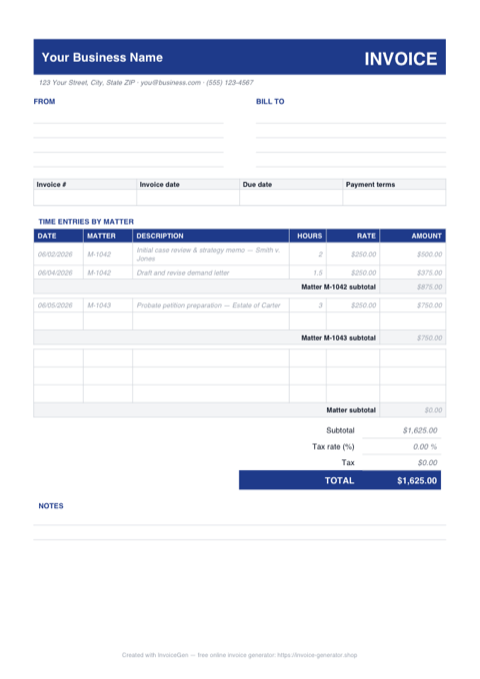
Download a Free Legal Invoice Template
Pre-built for how lawyers & law firms bill — grab it in the format you already work in. No sign-up required.
Prefer Google Docs? Download the Word file, upload it to Google Drive, and open it with Google Docs.
Invoicing Challenges for Lawyers & Law Firms
Billable Hours Tracking
Law firms bill in six-minute increments (tenths of an hour). A single missed entry or rounding error across hundreds of time entries per month can mean thousands in lost revenue or ethics complaints.
Trust Account Separation
Bar rules require strict separation of earned and unearned fees. Invoices must clearly show when funds are drawn from a client’s trust (IOLTA) account versus billed against earned fees, and errors can lead to disciplinary action.
LEDES Format Requirements
Many corporate clients and insurance companies require invoices in LEDES (Legal Electronic Data Exchange Standard) format. Submitting invoices in the wrong format means delayed payment and frustrated clients.
Lawyers & Law Firms Invoicing Tips
Record Time Entries in Detail
Each time entry should include the date, timekeeper initials, time in tenths, and a specific description of the work performed. Block billing (lumping multiple tasks into one entry) is disfavored by courts and clients.
Show Trust Account Draws Clearly
When drawing from a client’s trust account, show the trust balance, the amount applied to the current invoice, and the remaining balance. This satisfies bar requirements and keeps the client informed.
Bill Retainers with Transparency
For evergreen retainers, show the retainer amount, fees applied against it this period, and the remaining balance. Replenishment triggers should be clear so the client knows when to top up.
Separate Fees from Costs
Legal invoices should clearly distinguish attorney fees from hard costs (filing fees, court reporters, expert witnesses) and soft costs (copies, postage). This level of detail is expected in legal billing.
What to Include on a Lawyers & Law Firms Invoice
- Matter name and file/case number
- Timekeeper name, title, and billing rate
- Detailed time entries (date, hours, description)
- Attorney fees subtotal
- Hard costs (filing fees, court reporters, experts)
- Soft costs (copies, postage, research databases)
- Trust account balance and amount applied
- Payment terms and retainer replenishment threshold
Ready to invoice your next client?
Create Your Invoice NowFrequently Asked Questions
How should law firms track billable hours on invoices?
What are the trust account rules for legal invoices?
What is LEDES billing and do I need it?
How do I bill for a legal retainer?
Which Format Should You Use for Legal Invoices?
PDF, Excel, Word, or Google Docs — here is where each format earns its keep for lawyers & law firms.
Tamper-evident for fee petitions and court filings
When you attach an invoice to a motion for attorney's fees, the PDF signature and metadata prove the document wasn't altered post-hoc. A .docx leaves a trail of tracked changes a judge may find troubling; a finalized PDF reads as the authoritative copy.
Conforms to corporate counsel submission formats
In-house legal ops teams often require vendor invoices as PDF for archival. Even when LEDES is the primary billing format, a PDF backup is frequently required as the human-readable companion — submitting only a .docx forces a conversion on their end.
Excel
Tenths-of-hour arithmetic without rounding errors
A cell formatted as =C2*D2 with two decimal places produces exact line totals for 0.3 hours at $450, 1.7 hours at $325, and everything in between. Hand-calculating across fifty time entries is where billing mistakes cost real money — formulas eliminate the drift.
Separate fee and cost subtotals via SUMIF
Use =SUMIF(B:B,"Fee",E:E) and =SUMIF(B:B,"Cost",E:E) to split attorney time from pass-through expenses. This mirrors how legal invoices are expected to read — fees, hard costs, soft costs, grand total — without manually re-tallying each section.
Word
Matches your existing firm letterhead exactly
The same .dotx that produces your opinion letters and demand letters should produce your invoices. Clients recognize the firm visually before they read the first line. A templated PDF from an online generator never quite lands the same way as your actual letterhead.
Narrative fee statements read better than grids
Some practice areas — estate planning, transactional, appellate — prefer a narrative billing style over a time-entry table. Word handles prose with proper line spacing and hanging indents; Excel forces everything into cells and looks cramped for paragraph-length descriptions.
Google Docs
Partners review draft invoices with inline comments
The billing partner highlights a questionable 4.2-hour research entry and leaves a comment asking the associate to confirm. The associate responds, the partner resolves the thread, and the invoice is ready to send — all without a single email chain or a second meeting.
Version history satisfies bar inquiry documentation
If a client later disputes that a write-down was applied, Google Docs' version history shows the before-and-after state with timestamps. This kind of audit trail is useful in fee disputes and sometimes requested by bar counsel during a grievance investigation.
Pro Tips for Your Legal Invoice Template
Embed a unique invoice hash in the PDF footer
Add a short identifier like INV-2026-0087/SHA:a3f9 in small type at the bottom of every page. If a client later produces a doctored version in a fee dispute, you can instantly show the original hash doesn't match. It takes seconds at export time and it's saved more than one attorney in a billing disagreement.
Lock your rate-table cells with sheet protection before sharing
Select your timekeeper rate column, Format Cells > Protection > Locked, then Review > Protect Sheet with a password. A paralegal entering time can't accidentally type $350 when your rate is $385. Unprotect when you need to raise rates at year-end — a two-second safeguard against a recurring billing error.
Build styled paragraph styles for each entry type
Define Word styles named TimeEntry, DisbursementLine, and MatterHeader with set indents, fonts, and spacing. Apply the style rather than formatting each line by hand. When the firm decides to move from 11pt to 12pt body text, you change the style definition once and every invoice across every matter updates.
Use a privilege-reviewed folder structure inside Drive
Store invoices in a Drive folder named by matter, and set folder-level permissions that match your ethical wall. A partner on the plaintiff side should not see draft invoices from a matter where the firm represents the defendant's affiliate. Folder permissions enforce the conflict wall automatically — don't rely on per-document sharing, which gets sloppy under time pressure.
Related Templates & Tools
Legal Invoice Template
Free legal invoice template for lawyers and law firms. Track billable hours, trust accounts, retainers, and costs with compliant professional invoices.
Accountants & CPAs Invoice Generator
Free invoice generator for accountants and CPAs. Handle seasonal billing spikes, fixed vs hourly fees, bundled service packages, and value pricing.
Marketing Agencies Invoice Generator
Free invoice generator for marketing agencies. Manage retainer and project billing, ad spend pass-through, multi-client invoicing, and media cost separation.
How to Charge Late Fees on Invoices
When you can legally add late fees, how much to charge, and the wording to put on the invoice.