Construction Invoice Template — Excel
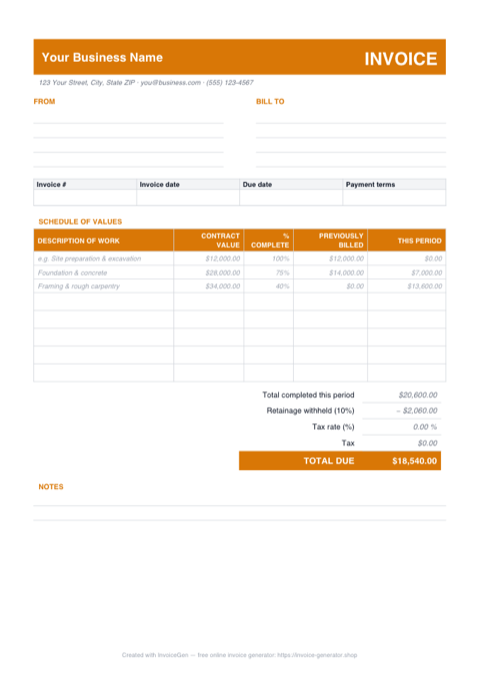
Open the .xlsx and the draw math is already wired. Enter a line's contract value and percent complete and the This Period column figures the billing on its own, netting out whatever you've previously billed. At the bottom, a highlighted retainage cell holds back 10% — or whatever your contract says — and Total Due recalculates the moment you change it.
Why Excel for Construction Companies
This Period computes itself from your SOV entries
Every schedule of values row carries a formula that multiplies Contract Value by % Complete and subtracts Previously Billed. Mark a $34,000 framing line 40% complete and $13,600 lands in This Period; bump it to 65% next cycle and the new draw is figured before you reach for a calculator.
An editable retainage cell wired into Total Due
The Retainage % cell is shaded yellow and ships at 10%. Drop it to 5% for a private job, or set it to 0% when the owner releases retainage at substantial completion — the Less Retainage line and TOTAL DUE update instantly, with no formula surgery required.
Blank-safe rows that never show errors
Five empty SOV rows below the examples already hold the draw formula, but each stays blank until you've entered both a contract value and a percent complete. No #VALUE! errors, no stray $0.00 clutter on rows you haven't touched yet — the sheet stays clean enough to send.
Tax in one cell, printed on one page
A second yellow cell holds the tax rate, defaulting to 0.00% since most jurisdictions don't tax progress billings — set it and Tax computes against the period total. Print setup is done for you too: A4 portrait, scaled to a single page, gridlines hidden.
Invoicing Challenges for Construction Companies
AIA-Style Progress Billing
Many commercial projects require AIA G702/G703 formatted applications for payment. These involve schedule-of-values breakdowns, percentage-complete tracking, and cumulative billing — far beyond a simple invoice.
Subcontractor Cost Pass-Through
General contractors bill for their own work plus subcontractor costs. Each sub’s charges need to be clearly represented on the invoice so the owner can track costs by trade and verify the work was completed.
Lien Waiver and Compliance Requirements
Many states require lien waivers to accompany each payment application. Your invoicing workflow needs to account for collecting and submitting these documents alongside every billing cycle.
Construction Excel Invoicing Tips
Roll the workbook forward each pay cycle
Before starting application #2, Save As a fresh copy, then add each line's This Period amount into its Previously Billed cell and update the percent complete. The formulas net out the new draw automatically, and your stack of saved copies becomes a per-application archive the owner's auditor can follow line by line.
Use a Schedule of Values
Break the total contract amount into a schedule of values by trade or phase. Each invoice shows the percentage complete and amount billed for each line item, giving the owner full cost visibility.
Track Retainage Cumulatively
Show retainage withheld on each invoice and maintain a running total. When the project reaches substantial completion, submit a separate invoice to release the accumulated retainage.
Separate GC Fees from Sub Costs
Clearly distinguish your general conditions and overhead from subcontractor pass-through costs. This transparency satisfies owner audits and streamlines payment approvals.
Reference Change Orders by Number
Every approved change order should have its own line in the schedule of values. Reference the CO number, date approved, and amount so the owner can reconcile each change against their records.
What to Include on a Construction Excel Invoice
- Project name, number, and site address
- Application number and billing period
- Schedule of values with percentage complete
- Work completed this period by line item
- Materials stored on-site (not yet installed)
- Retainage withheld (current and cumulative)
- Approved change order amounts
- Subcontractor cost breakdown by trade
Generate Your Construction Excel Invoice Now
Create Invoice — Free, No Sign-UpFrequently Asked Questions
What happens if I type a number over the This Period formula?
Which versions of Excel open this template?
Does it work in LibreOffice, Google Sheets, or Apple Numbers?
Related Invoice Tools
Construction Companies Invoice Generator
Free invoice generator for construction companies. Handle AIA-style progress billing, subcontractor costs, retainage, lien waivers, and change orders.
Excel Invoice Template
Free Excel invoice template library — download, customize, and send.
Construction Invoice Template
Free construction invoice template for progress billing, change orders, and materials tracking. Generate professional PDF invoices for any job size.
Construction Invoice — PDF
Free construction invoice PDF with ruled fill-in fields, a schedule of values grid with example draw lines, and a retainage block. Print, fill, and send.
Construction Invoice — Word
Free construction invoice template in Word. Overwrite the placeholder text, drop in your logo, recolor the accent to match your company, and save to PDF.
Auto Repair Invoice — Excel
Free auto repair invoice template in Excel (.xlsx) with separate parts and labor sections, self-totaling amount formulas, and an editable tax-rate cell.
Cleaning Invoice — Excel
Download a free cleaning invoice template in Excel (.xlsx) with service date and frequency columns, blank-safe amount formulas, an editable tax cell, and live totals.
Freelance Invoice — Excel
Free freelance invoice for Excel (.xlsx). Hourly and flat-fee sections feed one subtotal, amounts stay blank until filled, and a cell sets the tax rate.