Freelance Invoice Template — Excel
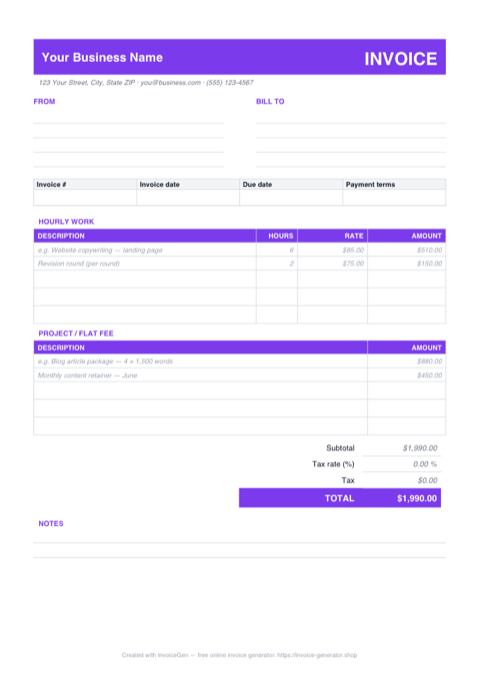
This .xlsx is built around how freelancers actually bill: an HOURLY WORK section that multiplies Hours × Rate on each row, and a PROJECT / FLAT FEE section where you type the figure directly. Both feed the same subtotal, so a monthly retainer and a handful of ad-hoc hours total correctly on a single invoice.
Why Excel for Freelancers
Two billing sections, one subtotal
Time-based rows live under HOURLY WORK and compute their own amounts; fixed-price rows live under PROJECT / FLAT FEE and take whatever you type. The Subtotal cell sums both ranges — =SUM(D16:D20)+SUM(D23:D27) — so mixed billing never needs a second invoice.
Amount formulas stay blank until a row is real
Each hourly amount checks that both Hours and Rate are filled before multiplying them, returning an empty cell otherwise. The spare rows show nothing instead of a column of $0.00, and a half-entered line can't leak into your total.
One shaded cell drives the tax math
The highlighted Tax rate cell beside Subtotal is percent-formatted — type 20 and it reads 20.00%, the Tax row computes Subtotal × rate, and TOTAL updates before you lift your finger. Leave it at zero if you don't charge VAT or sales tax.
Sample rows model the billing pattern
The sheet ships with realistic freelance lines — landing-page copywriting at 6 hrs × $85, a $450 monthly content retainer — so you can see where hourly work ends and flat fees begin. Overwrite them with your own scope and the formulas keep working.
Invoicing Challenges for Freelancers
Irregular Income Tracking
Freelance income arrives in unpredictable waves. Without numbered, dated invoices it is nearly impossible to reconcile what has been paid, what is outstanding, and what your actual monthly revenue looks like.
Looking Professional to Clients
A sloppy invoice signals sloppy work. Clients at larger companies expect a polished document with your logo, clear line items, and proper payment details — not a hastily typed email with a total at the bottom.
Chasing Late Payments
Nearly 60% of freelancers experience late payments. Without explicit due dates, late-fee clauses, and a paper trail, you have no leverage when following up on overdue invoices.
Freelance Excel Invoicing Tips
Insert new rows inside the section, not after it
Need a sixth hourly line? Right-click a row in the middle of the HOURLY WORK block and choose Insert — Excel stretches the SUM ranges automatically and the new row inherits the section. A row added below the last line of a section sits outside the subtotal and silently never gets billed.
Set Payment Terms Upfront
Agree on Net 15 or Net 30 terms before starting any project. Print those terms on every invoice so the due date is never ambiguous.
Itemize Hours vs. Fixed Rates
If you bill hourly, list each task with hours and rate. If you bill a flat fee, break it into milestones so the client sees value at every stage.
Follow Up Systematically
Send a friendly reminder three days before the due date, a firm notice on the due date, and escalate weekly after that. Keep a copy of every invoice for your records.
Number Invoices Sequentially
Use a consistent numbering system like INV-2024-001. Sequential numbering makes tax filing faster and helps you spot missing payments at a glance.
What to Include on a Freelance Excel Invoice
- Your full legal name or business name
- Client company name and contact
- Invoice number and date issued
- Description of each deliverable or hours worked
- Hourly rate or fixed project fee
- Payment terms (Net 15, Net 30, etc.)
- Accepted payment methods (bank transfer, PayPal, etc.)
- Late payment penalty clause
Generate Your Freelance Excel Invoice Now
Create Invoice — Free, No Sign-UpFrequently Asked Questions
Which apps open this .xlsx — do I need a recent Excel?
Why is the Amount column empty on the unused rows?
What happens if I delete the example line items?
Related Invoice Tools
Freelancers Invoice Generator
Free invoice generator for freelancers. Track irregular income, look professional to clients, and get paid faster with clear terms and instant PDF downloads.
Excel Invoice Template
Free Excel invoice template library — download, customize, and send.
Freelance Invoice Template
Free freelance invoice template with automatic totals, tax fields, and instant PDF download. Bill clients professionally in seconds.
Freelance Invoice — PDF
Free freelance invoice template as a print-ready A4 PDF with separate hourly and flat-fee tables, ruled fill-in fields, and a notes block. Fill it in and send.
Freelance Invoice — Word
Free editable Word .docx freelance invoice. Overtype the placeholders, drop a logo beside the INVOICE banner, restyle the violet accents to your brand, then export a PDF.
Contractor Invoice — Excel
Excel contractor invoice with a built-in materials/labor split, blank-safe line formulas, and editable markup % and tax-rate cells. Totals recalculate as you type.
Consulting Invoice — Excel
Free consulting invoice for Excel (.xlsx): a time-tracking sheet where Date, Hours, and Rate feed blank-safe formulas, a Total hours counter, and a tax cell.
Photography Invoice — Excel
Free photography invoice template for Excel. Package and add-on rows multiply quantity by rate, the tax cell is editable, and the retainer feeds the balance.