Auto Repair Invoice Template — PDF
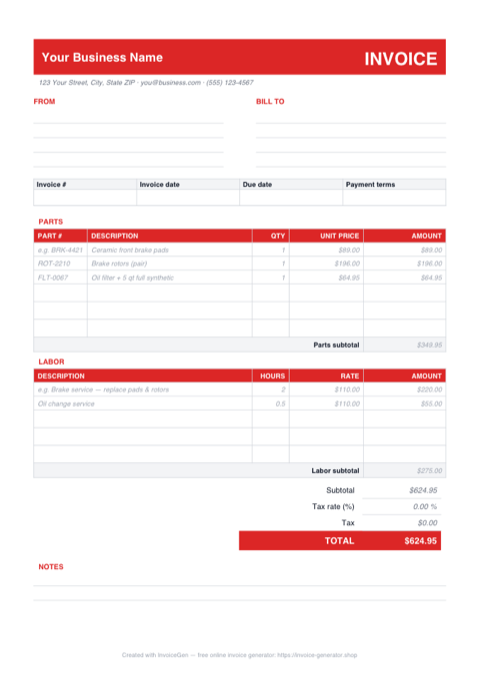
The download is a one-page A4 invoice laid out the way a repair order reads: a PARTS table with a part-number column, a LABOR table billed in hours and rate, and a totals block with a tax line. Each section ships with sample lines (a brake job and an oil change) plus blank rows you can fill by pen at the counter or with a PDF annotator before sending.
Why PDF for Auto Repair Shops
Blank rows ready for pen or Fill & Sign
Three empty rows sit under both the PARTS and LABOR sections. Hand-write a ticket at the service desk, or type into the rows with Acrobat Reader's free Fill & Sign tool or macOS Preview, then print or email. The sample entries — ceramic pads, a rotor pair, 2.0 hours of brake labor — show the service writer exactly how a line should read.
Totals nobody downstream can nudge
When an invoice rides along with an insurance supplement or gets uploaded to a fleet maintenance portal, a PDF's numbers are fixed ink. The parts subtotal, labor subtotal, and TOTAL the customer authorized at pickup are the same figures the adjuster sees — no spreadsheet cell for anyone to fat-finger after the fact.
Prints true on A4 and scales cleanly to Letter
The page is sized A4, the international standard. On a US Letter counter printer, pick "Fit to printable area" in the print dialog and it scales down about 3% with nothing clipped — the TOTAL row and the notes block stay inside the margins on either paper size.
Attaches small and opens everywhere
The file is only a few kilobytes, so it sails under insurer and fleet-portal attachment limits and opens instantly on a customer's phone. It uses standard Helvetica with no embedded extras, so what you see at the shop is pixel-for-pixel what the fleet manager files.
Invoicing Challenges for Auto Repair Shops
Parts and Labor Breakdown
Customers distrust lump-sum repair bills. They want to see every part listed with its cost and every hour of labor justified. A vague invoice leads to negative reviews and lost repeat business.
Warranty Tracking
Parts and labor warranties vary by component and supplier. Your invoices need to clearly state warranty terms for each item so you and the customer both know what is covered if something fails.
Insurance and Fleet Claims
Insurance companies and fleet managers require specific invoice formats with detailed descriptions, part numbers, and labor codes. Generic invoices get rejected or delay reimbursement.
Auto Repair PDF Invoicing Tips
Write the VIN and odometer reading into the NOTES block before printing
Warranty claims and lemon-law disputes turn on mileage at the time of service, and the NOTES area at the bottom of this template is the natural home for it. Jot "VIN ... / 84,212 mi at drop-off" there before you print or annotate — once it's in the PDF, it's stamped into the service record permanently, which is exactly what an extended-warranty administrator asks for first.
Include Part Numbers and Brands
List the OEM or aftermarket part number, brand, and whether the part is new or remanufactured. This level of detail builds customer confidence and simplifies warranty claims.
Standardize Labor Rate Display
Show your shop’s hourly labor rate and the time allocated for each repair task. Reference industry-standard labor guides (like Mitchell or AllData) so customers see that your estimates are fair.
Add Vehicle Details to Every Invoice
Include the vehicle’s year, make, model, VIN, and current mileage. This creates a service history record and is essential for warranty and insurance claims.
Note Warranty Terms Per Line Item
Different parts carry different warranties. Note the warranty period (e.g., 12 months / 12,000 miles) next to each part so the customer has a clear reference if an issue arises.
What to Include on a Auto Repair PDF Invoice
- Vehicle year, make, model, and VIN
- Current mileage at time of service
- Each part with part number, brand, and cost
- Labor hours and shop hourly rate
- Warranty terms for parts and labor
- Diagnostic fees
- Shop supplies and environmental fees
- Authorization signature or work order reference
Generate Your Auto Repair PDF Invoice Now
Create Invoice — Free, No Sign-UpFrequently Asked Questions
Can I type into this PDF instead of filling it by hand?
Will an A4 PDF print correctly on a US Letter printer?
What's the best way to email this invoice to a customer or adjuster?
Related Invoice Tools
Auto Repair Shops Invoice Generator
Free invoice generator for auto repair shops. Break down parts and labor, track warranty coverage, handle insurance claims, and create detailed repair invoices as PDF.
PDF Invoice Template
Free PDF invoice template library — download, customize, and send.
Auto Repair Invoice Template
Free auto repair invoice template with parts, labor, and warranty tracking. Generate detailed repair invoices as professional PDFs in seconds.
Auto Repair Invoice — Excel
Free auto repair invoice template in Excel (.xlsx) with separate parts and labor sections, self-totaling amount formulas, and an editable tax-rate cell.
Auto Repair Invoice — Word
Free auto repair invoice template as a .docx. Overtype the placeholder text, add your shop logo, swap the red accent for your brand color, and save to PDF.
Consulting Invoice — PDF
Free consulting invoice PDF with a date/hours/rate time-tracking table, FROM and BILL TO blocks, and a notes area. Fill it on screen, print it, or email it.
Photography Invoice — PDF
Free photography invoice template as a print-ready A4 PDF with blank FROM, BILL TO, and line-item rows, plus a deposit and balance-due section. Fill it in and send it.
Cleaning Invoice — PDF
Free cleaning invoice template as a print-ready A4 PDF. Sample weekly and bi-weekly service lines show how to bill — print it, fill in the visits, and email it.