Cleaning Invoice Template — PDF
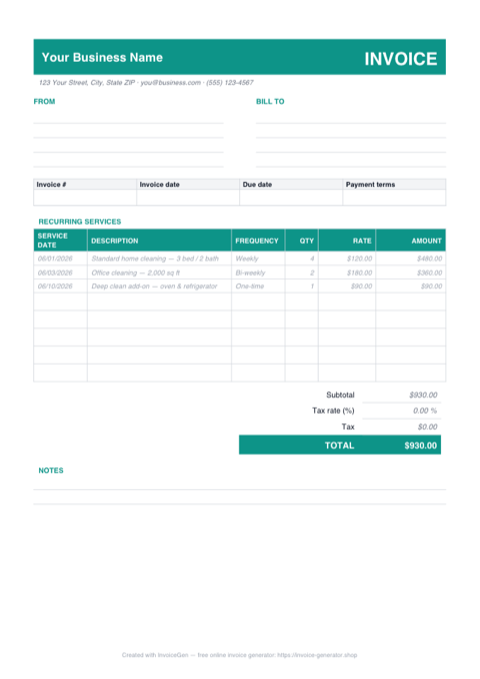
This download is a one-page A4 invoice with a recurring-services table already laid out: service date, description, frequency, visit count, and rate. Three sample lines — a weekly home cleaning, a bi-weekly office, and a one-time deep-clean add-on — model exactly how to bill, and the blank rows beneath them are sized for handwriting. Print a stack for the van or attach it straight to an email.
Why PDF for Cleaning Services
Sample lines show recurring billing done right
The filled-in rows demonstrate the pattern: four weekly visits at $120 each, two bi-weekly office cleans at $180, a one-time oven-and-fridge add-on. Copy that structure for your own properties and the qty column becomes your visit count, not a unit count.
Blank rows you can fill with a pen
Because the layout is fixed, you can print the page and write in visit dates on a clipboard at the property. Nothing reflows or shifts the totals box the way an editable file can when a row gets taller.
The numbers are locked once it's sent
A static PDF beats an editable file the moment money is in dispute. The visit count and rates can't be nudged after the invoice leaves your outbox, and AP portals at property management firms ingest PDFs without a conversion step.
A few kilobytes that open anywhere
The file is small enough to never trip an attachment limit and opens in any browser, phone mail preview, or front-desk printer queue — no spreadsheet app or Word license required on the client's end.
Invoicing Challenges for Cleaning Services
Recurring Billing Management
Most cleaning clients are on weekly, bi-weekly, or monthly schedules. Generating individual invoices for every visit is tedious, but bundling visits into a monthly invoice requires careful tracking of completed services.
Multiple Locations for Commercial Clients
A single commercial client may have several offices or properties. Each location has different square footage, service frequency, and pricing — and the client often wants one consolidated invoice.
Supply and Equipment Cost Recovery
Cleaning supplies and equipment wear are real costs. Deciding whether to absorb them in your rate or pass them through as line items affects pricing transparency and client expectations.
Cleaning PDF Invoicing Tips
Print two copies per job: one to leave, one to sign
On the last visit of the billing cycle, leave one filled copy on the counter or with the office manager and have a second initialed for your records. The frequency column doubles as proof the client agreed to the schedule being billed — which settles most 'we only had three visits' calls before they start.
Create Service Packages
Define packages like Basic (vacuum, dust, mop), Deep Clean (add windows, baseboards, appliances), and Move-Out (everything). Listing the package on the invoice sets clear expectations for what was performed.
Invoice on a Monthly Cycle
For recurring clients, compile all visits into a monthly invoice. List each visit date and service performed so the client can verify against their schedule before paying.
Track Supplies Separately for Large Contracts
For commercial contracts where you supply all materials, add a supplies line item or a flat materials surcharge. This makes your labor rate look competitive while recovering real costs.
Include Scheduling Notes
Note the regular schedule (e.g., every Tuesday and Thursday, 8 AM - 12 PM) on the invoice header. This serves as a service-level agreement and helps both parties confirm the expected cadence.
What to Include on a Cleaning PDF Invoice
- Service package or type performed
- Dates of each cleaning visit
- Property address and square footage
- Number of crew members and hours per visit
- Supplies and materials cost (if passed through)
- Frequency (weekly, bi-weekly, monthly)
- Special services (carpet cleaning, window washing)
- Next scheduled service date
Generate Your Cleaning PDF Invoice Now
Create Invoice — Free, No Sign-UpFrequently Asked Questions
Can I type directly into this cleaning invoice PDF?
Will the A4 page print correctly on US Letter paper?
What's the best way to email this invoice to a property manager?
Related Invoice Tools
Cleaning Services Invoice Generator
Free invoice generator for cleaning services. Manage recurring billing, multiple locations, supply costs, and service packages with professional PDF invoices.
PDF Invoice Template
Free PDF invoice template library — download, customize, and send.
Cleaning Service Invoice Template
Free cleaning service invoice template for recurring billing, multiple locations, and service packages. Download professional PDF invoices instantly.
Cleaning Invoice — Excel
Download a free cleaning invoice template in Excel (.xlsx) with service date and frequency columns, blank-safe amount formulas, an editable tax cell, and live totals.
Cleaning Invoice — Word
Free cleaning invoice template in Word (.docx). Overwrite the placeholders, add your logo, recolor the teal accents, then save as PDF — or open it in Google Docs.
Freelance Invoice — PDF
Free freelance invoice template as a print-ready A4 PDF with separate hourly and flat-fee tables, ruled fill-in fields, and a notes block. Fill it in and send.
Construction Invoice — PDF
Free construction invoice PDF with ruled fill-in fields, a schedule of values grid with example draw lines, and a retainage block. Print, fill, and send.
Contractor Invoice — PDF
Contractor invoice template in PDF — fill it on screen or by hand, print on A4 or Letter, and email a totals-locked bill to the GC. Free download, no sign-up.